Plotagon Studio
- 4.3
- Rating
- 500.00K
- Installs
- Free
- Price

 Analysis by App-foxy
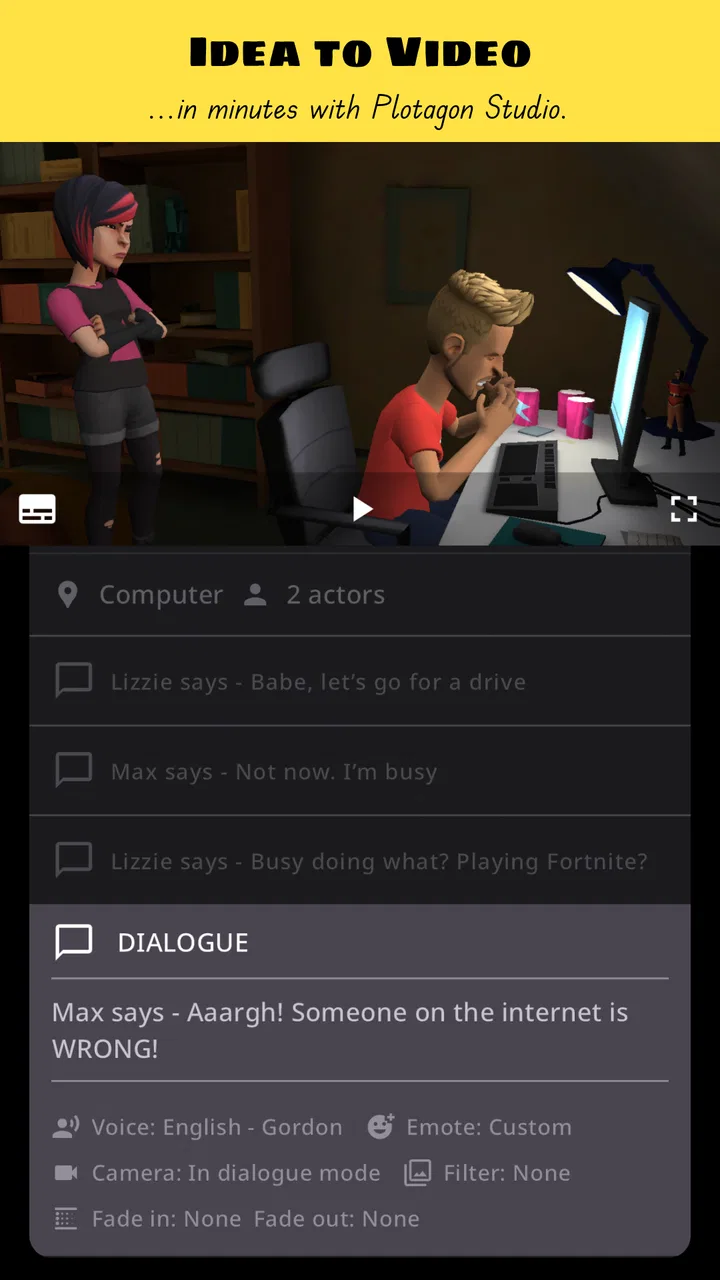
Making a short animated story usually sounds easier than it is. You may have a scene in mind, a few lines of dialogue, and a character who needs to react at exactly the right moment. Then the usual work begins: drawing, finding suitable images, recording voices, editing clips, and trying to make everything feel connected. Plotagon Studio takes a different route. It is an animation-focused video app from Plotagon that lets you build a story from prepared visual elements instead of starting with a blank editing timeline.
I found its appeal strongest when I wanted to turn a simple idea into something watchable without learning traditional animation first. It is not trying to replace a full video editor, a hand-drawn animation program, or a professional production suite. Its purpose is narrower and more approachable: help you shape a scene, give characters something to say or do, and turn that scene into an animated video. That focus makes the first experience less intimidating, although it also means creative control is more limited than in an open-ended editor.
The app is free to install, with optional purchases ranging from $1.99 to $9.99 per item. It carries a Teen content rating, and its current release is version 1.6.0 for devices running Android 9 or later. Plotagon Studio was released on May 22, 2024, and it has already reached over 500 thousand installs with an average score of 4.3 from around 9.8 thousand ratings. Those figures suggest a healthy level of interest, but they do not tell you whether the workflow suits your particular kind of story. That is what matters most here.
You May Also Like

 Blood Strike: 2.5 Anniversary
Blood Strike’s Loadouts Turn Every Drop Into a Tactical Gamble
A close look at Blood Strike’s custom loadouts: how fast access to signature weapons reshapes its battle royale rhythm, rewards preparation, and narrows the gap between fights.

 Pandora - Music & Podcasts
Pandora’s Music Is Easy to Start, but Harder to Recover
Pandora’s strength is its low-effort path from a seed to a station. Its weak spot is how much confidence it asks you to place in connection, setup, and quiet recovery.

 8 Ball Pool
 Is Built on Rivalries, Rematches, and Routine
A close look at the rivalries, rematches, shared routines, and unanswered safety questions that turn a quick pool match into a persistent mobile community.

 Samsung Music
’s Quiet Strength Is Playing What You Already Own
Its reach comes less from spectacle than from dependable access to a personal library. That simplicity is both the app’s strongest retention engine and its ceiling.

 AccuWeather: Weather Radar
AccuWeather Review: A Quick, Clear Forecast for Everyday Decisions
For everyday plans, the best forecast is the one you can understand quickly. AccuWeather makes rain timing, radar, and local conditions easy to act on, with a few trade-offs.

 Hill Climb Racing
Why Hill Climb Racing Still Turns Crashes Into One More Run
A tiny car, a bumpy hill and one more upgrade: Hill Climb Racing keeps resurfacing because its simple chaos makes every near-miss feel personal.
More From Our News Desk
View All News


From a blank idea to a usable animated scene
When I first approach an app like this, I want to know whether it helps me reach a meaningful result quickly. Plotagon Studio is most comfortable for short scenes: a conversation, a small comic situation, a classroom explanation, a character introduction, or a quick visual message. I would not begin with the expectation of producing a long film. A short scene gives you room to understand the controls, judge the available creative choices, and discover whether the built-in style matches your idea.
The important change in mindset is that you are directing rather than drawing every frame. You decide what the scene is about, which characters should be present, what they should say, and how the moment should unfold. The app handles much of the visual presentation through its animation system. That is a relief for a first-time creator because the early challenge becomes storytelling instead of technical animation.
There is also a useful trade-off. A guided system can make a scene feel coherent sooner, but it cannot give you unlimited freedom. If your concept depends on a very specific camera move, unusual body language, custom scenery, or frame-by-frame timing, you may eventually feel boxed in. For a quick story with recognizable actions, that structure is helpful. For experimental animation, it may feel restrictive.
I would describe the visual result as something designed to communicate an idea clearly rather than imitate a major studio production. That is not a criticism. For a message to friends, a humorous sketch, or a simple explainer, clarity is often more valuable than visual complexity. The app works best when you lean into its readable, scene-based format instead of trying to force it into a style it was not built to deliver.
Who will get the most from it
Plotagon Studio is a good starting point for people who have stories but do not want to learn illustration or conventional animation software. Students can use it to present a short dialogue or demonstrate a situation. Casual creators can turn a joke into a visual scene. Teachers and presenters may find the format useful when a spoken explanation would be more memorable with characters acting it out.
It can also suit someone who wants to test a script before investing time in a larger project. I like the idea of using a short animated scene as a storyboard with personality. Hearing the dialogue in context and watching the characters occupy the same space can expose weak writing much earlier than reading the script alone.
I would be more cautious about recommending it to a creator who needs detailed control over every visual element. If you already work comfortably in a timeline editor and your priority is precise cutting, layered graphics, custom sound design, or advanced compositing, a standard video editor will probably remain the better main tool. Plotagon Studio is more useful as a focused storytelling environment than as an all-purpose editing workstation.
What to prepare before opening the app
A small amount of planning makes the first session much smoother. Before I start, I write a very short outline with three parts: what changes in the scene, who speaks first, and what the viewer should understand by the end. This prevents the common beginner problem of adding characters and dialogue without a clear purpose.
I also keep the first script short enough to revise easily. A compact exchange lets me concentrate on the app’s rhythm and presentation. If the first attempt becomes too long, it is harder to tell whether a problem comes from the writing or from the way the scene is assembled. Starting with one location and a small cast is not merely simpler; it gives you a clean test of the workflow.
Think about the audience as well. A scene intended for children, classmates, coworkers, or friends may need a different tone, and the Teen rating is a useful reminder to review your dialogue and subject matter before sharing. The rating does not decide whether your particular story is appropriate, so I would still read through every line as if I were seeing it without context.
The first setup: keep the experiment deliberately small
After installing the app, I recommend resisting the urge to build a complete episode immediately. Begin by exploring the basic path from creating a scene to previewing it. The goal of this first session is not polish. It is to learn where the important decisions live and how quickly you can move from an idea to a visible result.
Start with one simple situation. A character arrives, asks a question, misunderstands something, or delivers a short explanation. Select only the elements needed to make that situation understandable. Every extra choice adds another thing to evaluate, and beginners often spend more time browsing possibilities than shaping the story.
Once the scene exists, read the dialogue aloud before worrying about presentation. Spoken lines that look fine on a page can sound stiff when performed. I found that this check is especially valuable in an animated format because the character’s delivery and the visual action need to feel like parts of the same moment. If a line is too long, simplify it before adding more decoration.
One practical habit is to save or preserve a basic version before experimenting. That gives you a safe point to return to when a new change makes the scene less clear. It also encourages bolder testing: you can try a different order, tone, or character choice without feeling that you have ruined the only version.
The first meaningful success
Your first real win is not simply opening a project. It is creating a short scene that another person can understand without an explanation from you. To reach that point, give the scene a beginning, a clear exchange, and a small ending. The ending does not need to be dramatic. It might be an answer, a reaction, a joke, or a decision.
I suggest watching the result once without editing it. Notice where your attention drops. Is the opening too slow? Does a character speak for too long? Does the final line actually resolve the situation? This viewing is more useful than immediately chasing visual perfection because it shows whether the story communicates.
Then make one focused revision. Change the weakest line, remove an unnecessary beat, or adjust the order of the exchange. Avoid changing everything at once. A single deliberate revision teaches you more about cause and effect than a long session of random adjustments.
A realistic everyday example would be a student preparing a short presentation about handling a misunderstanding. Instead of placing a block of text on slides, the student could create two characters, let one make an incorrect assumption, and use the second character to clarify the situation. The animation gives the explanation a small narrative shape. It may not replace the presentation, but it can make the central example easier to remember.
Where first-time users can get confused
The biggest source of confusion is expecting the app to behave like a conventional video editor. In a timeline-based editor, you normally bring in clips, trim them, arrange layers, and control the final sequence directly. Plotagon Studio begins with the story and scene structure. That can feel unfamiliar if your instinct is to collect media first and organize it afterward.
Another adjustment is accepting that the available visual choices guide the tone. When a tool provides a defined animation environment, the story needs to work within that environment. If you keep searching for a perfect match to an image in your head, you may spend too much time fighting the format. I get better results by asking, “What version of this idea works naturally here?”
Dialogue can create a second problem. New users often write lines that explain everything because they are thinking about the script rather than the performance. Animated characters are more convincing when each line has a purpose: asking, reacting, correcting, revealing, or ending the exchange. If every character says exactly what the viewer already sees, the scene becomes slow.
There is also a difference between a scene that is technically complete and one that feels finished. A complete scene has content in it. A finished scene has a clear focus, a sensible pace, and an ending that feels intentional. The app can help you assemble the former, but the latter still depends on your editing judgment.
Using the app without overspending
Because the app is free to use initially and offers optional in-app purchases, I would explore the basic workflow before buying anything. First determine whether you enjoy creating scenes and whether the available approach fits your projects. Paying for additional creative options only makes sense after you know what kind of material you actually need.
A useful way to evaluate a purchase is to identify a specific limitation in your current project. Do not buy simply because an option looks interesting. Ask whether it will improve the character, setting, or moment that your story genuinely requires. This keeps the decision tied to a finished idea rather than to browsing temptation.
I also recommend completing a small project with the free path first. That gives you a reference point for judging whether an extra item changes the result in a meaningful way. If the story is already clear and enjoyable without it, the purchase may be unnecessary. If a missing creative element is preventing the scene from making sense, then the value is easier to assess.
Three workflows that make the format more useful
My first recommended workflow is to write the scene as a conversation with a hidden turn. Begin with an ordinary exchange, then introduce one new piece of information that changes how the viewer understands it. This works well with a character-based animation app because the visual presence of the speakers supports the shift in tone. The trick is to keep the turn simple enough that the characters’ reactions remain easy to follow.
The second is to use the app as a previsualization tool. Before recording a live video or building a larger presentation, create a short animated version of the sequence. This can reveal whether the order of information makes sense. It is especially helpful when several people are involved, because you can share the scene as a common reference rather than describing the idea in abstract terms.
The third is to separate writing passes from staging passes. In the first pass, concentrate on what each character needs to communicate. In the second, consider how the scene should look and feel. Mixing both tasks at once can lead to attractive but unfocused results. Separating them makes it easier to notice whether a visual choice supports the message or merely adds activity.
A less obvious advantage is that the app can help you practice concise communication. Since a short animated scene has limited room for wandering, it encourages you to remove repeated explanations. I would use that constraint deliberately: if a line does not change the situation, challenge whether it belongs.
How it compares with familiar alternatives
Compared with a traditional mobile video editor, Plotagon Studio asks less of you at the beginning. A standard editor is better when you already have recorded footage, photographs, music, voice clips, or screen recordings and want to arrange them precisely. Plotagon Studio is better when the story exists mainly as an imagined interaction between characters and you want a visual version without filming.
Compared with drawing-based animation tools, it removes much of the manual illustration work. That makes it more approachable for a first attempt, but drawing apps usually offer more freedom for personal style and unusual movement. If your goal is to create a distinctive hand-drawn look, this is unlikely to be the strongest choice.
Compared with presentation software, it gives a short explanation more character and movement. Presentation tools remain better for charts, dense information, and formal slide structure. I would use Plotagon Studio for the human example that makes the information relatable, then use another tool for the detailed supporting material.
Compared with filming real people, the app avoids cameras, locations, retakes, and performance anxiety. That is valuable for private drafts or fictional situations that would be awkward to record. Real video still wins when natural facial expression, physical detail, or an authentic setting is the main point.
Questions I would answer before recommending it
Is it suitable for a complete beginner? Yes, provided the beginner starts with a short scene rather than a full production. The guided nature of the experience is its main strength, but you still need to make basic storytelling decisions. The app can reduce technical barriers; it cannot choose a clear idea for you.
Can it replace a full video editor? I would not treat it that way. It is a focused tool for creating animated story scenes. If your project depends on extensive media editing, precise transitions, layered text, or detailed audio work, keep a conventional editor in your workflow.
Is it useful beyond making jokes? Definitely. I can see practical value in short demonstrations, story drafts, classroom examples, character introductions, and simple explanations. The best use cases have a clear situation and a small amount of information to communicate.
Should you pay immediately? No. Use the free experience to decide whether the scene-building approach feels natural. If you later identify a particular creative need, consider the optional purchase in relation to that project instead of treating every extra option as essential.
Will every idea translate well? No. Ideas that depend on highly specific movement, subtle acting, custom visual design, or a large number of locations may be better served by another tool. Plotagon Studio is strongest when the story can be expressed through concise dialogue and recognizable animated staging.
The next step after your first scene
Once your first short scene works, do not immediately make it longer. Make a second scene with a different purpose. Try an explanation instead of a joke, or a disagreement instead of a friendly exchange. This will show whether you like the app itself or only enjoyed the novelty of the first experiment.
After that, build a tiny sequence with a beginning and a consequence. Reuse the same central idea, but make the second moment respond to the first. This is where the tool becomes more than a way to create isolated clips: you begin thinking about continuity, pacing, and what the viewer should expect next.
Keep your scripts organized outside the app as they grow. A simple note with the scene goal, speakers, and final line can prevent you from losing the thread while experimenting. I also prefer to name projects by their purpose rather than by vague labels, because a clear working title makes later revisions much easier.
My overall view is positive, with a clear boundary. Plotagon Studio is a friendly entry point for turning a written idea into an animated video, particularly when you want characters and dialogue without drawing or filming. The free starting point lowers the risk, while the optional purchases let interested users consider more creative choices as their needs become clearer. At the same time, its guided format will not satisfy everyone.
My recommendation is to try it if your priority is reaching a first animated story quickly, not controlling every frame. Start with one location, a brief exchange, and a definite ending. If that small result makes you want to write another scene, the app has probably found its place in your creative routine. If you immediately miss the precision of a timeline editor or the freedom of a drawing canvas, move to one of those alternatives instead. For the right kind of beginner, though, it offers a reassuring path from “I have an idea” to “I can show it.”
Plotagon Studio earns its strongest recommendation as a focused storytelling companion. Developed by Plotagon and positioned among video players and editing tools, it is most valuable when simplicity is part of the goal. I would use it for quick visual drafts, short character-led explanations, and compact animated scenes that need to be understood rather than endlessly polished. That is a modest promise, but in my experience it is a useful one.
FAQs for Plotagon Studio
01What is Plotagon Studio and what can you create with it?
Plotagon Studio is an animation and storytelling app designed for creating short 3D movies without requiring professional animation skills. After installing it, users can build scenes, choose characters, write dialogue, select locations, and add actions or emotions. It is especially useful for animated stories, educational presentations, social media clips, role-playing scenarios, and simple visual explanations.
02Is Plotagon Studio suitable for beginners without animation experience?
Yes, Plotagon Studio is aimed at beginners and makes animation more accessible through ready-made characters, environments, movements, camera options, and dialogue tools. You do not need to draw every frame or learn complex 3D software. However, producing a polished video still requires time and experimentation, particularly when adjusting timing, character behavior, scene transitions, voice recordings, and the overall flow of the story.
03Does Plotagon Studio include free content, or are purchases required?
Plotagon Studio generally provides a selection of basic content so new users can test the main animation features before spending money. Additional characters, outfits, locations, props, voices, or other creative assets may be offered through in-app purchases, subscriptions, or separate content packs, depending on the platform and current version. Check the store listing and in-app pricing before downloading if your budget is limited.
04Can you add your own voices, dialogue, and music in Plotagon Studio?
The app is built around scripted dialogue, and users can usually create conversations by typing lines and selecting available voice options. Depending on the version and device, voice recording or imported audio may also be supported, but available tools can differ between releases. Music and sound choices may be limited to the app’s included library, so review current permissions and features before planning a complex production.
05Can videos made with Plotagon Studio be exported and shared?
Plotagon Studio is intended to let users turn their animated scenes into video projects that can be saved or shared, although export options, resolution, watermarks, file formats, and sharing destinations may vary by device and account type. Some features may require payment or additional processing time. Before creating a long movie, make a short test export to confirm the quality and available sharing options.
Pros
- Easy drag-and-drop tools make animated scene creation accessible.
- Built-in characters
- locations
- and props speed up project development.
- Dialogue recording helps personalize characters without external audio software.
- Facial expressions and gestures add personality to animated conversations.
- Useful for classroom presentations
- storytelling
- and short creative projects.
Cons
- Advanced customization is limited compared with professional animation software.
- Large projects may require substantial storage and processing power.
- Some assets and features may be restricted to paid plans or purchases.
- Rendering and exporting can take time
- especially on older mobile devices.
- The app may feel difficult at first when managing scenes and character timing.

Plotagon Studio
Gallery